Included with Telescopo Markdown Studio: PDF export is part of the full authoring workspace with split preview, Mermaid, LaTeX, templates, themes, and polished print controls.
Markdown PDF Export Should Show the Final Page First
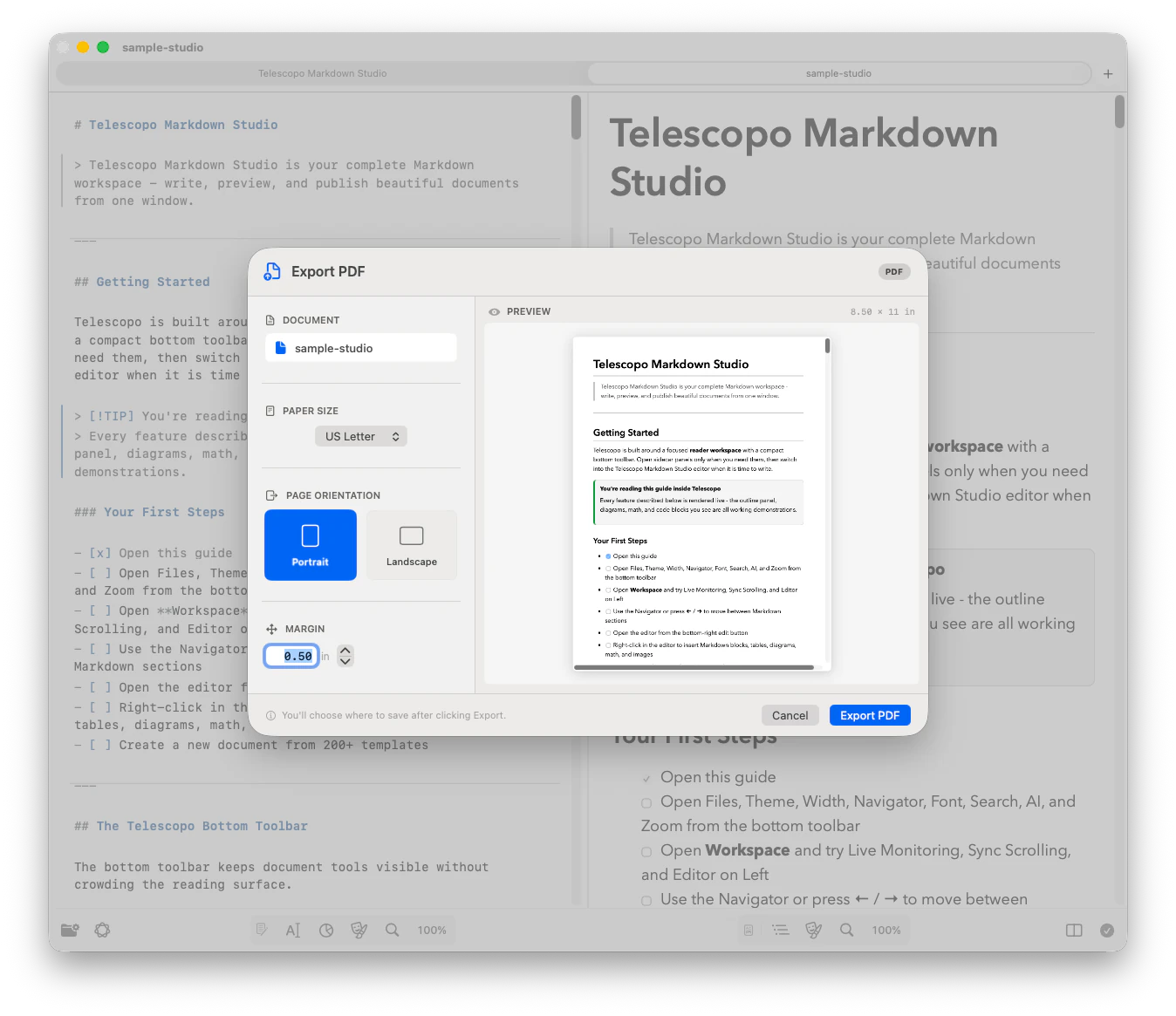
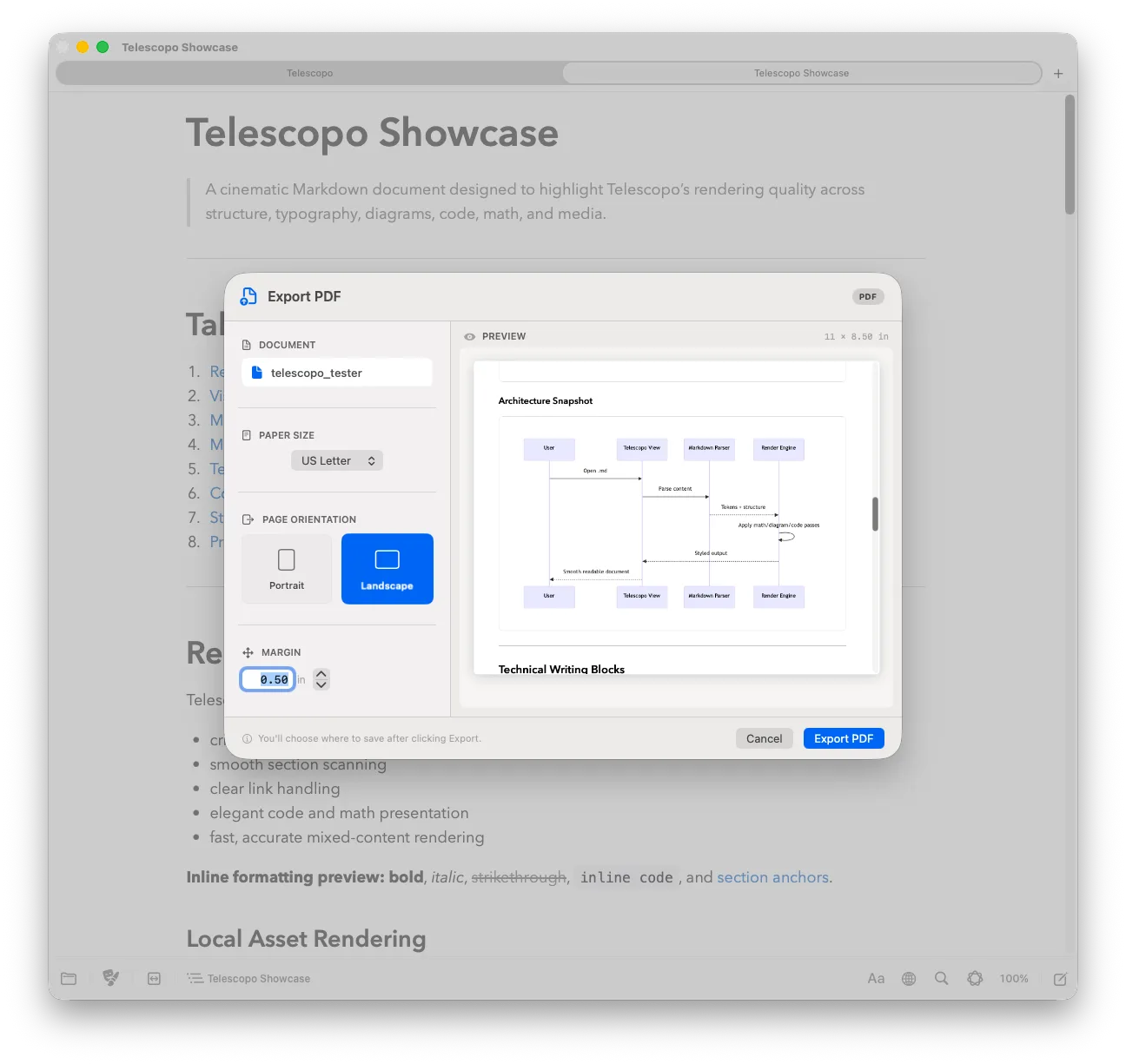
Telescopo treats Markdown PDF export like document production. Before saving, you can preview the page with the selected paper size, margin spacing, orientation, theme, diagrams, math, images, and code blocks already rendered.
Export to US Letter, A4, Legal, A3, and Tabloid. Tune custom margins, then choose portrait or landscape based on the shape of the document. The goal is simple: the PDF should match the Markdown document you reviewed on screen.
Paper sizes
US Letter, A4, Legal, A3, and Tabloid for notes, handouts, reports, diagrams, and wide docs.
Custom margins
Adjust page spacing before export so prose, diagrams, and screenshots have room to breathe.
Dynamic preview
Inspect the actual rendered page instead of guessing through a browser print fallback.
Rich Markdown preserved
Mermaid, LaTeX, images, syntax-highlighted code blocks, tables, and themes remain rendered.
Inspect the Export Source
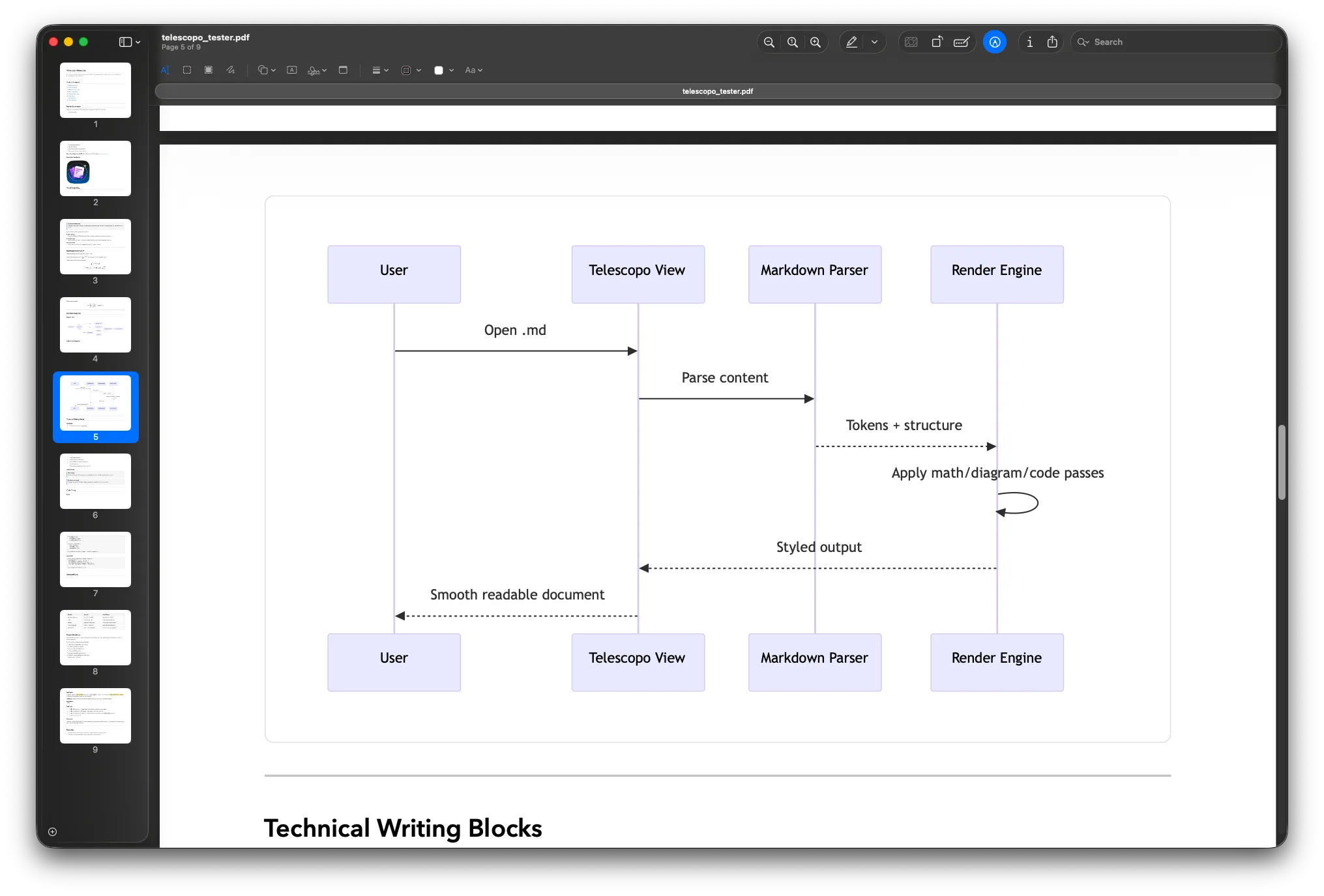
The downloadable sample combines the content most likely to expose an export problem: a wide Mermaid sequence diagram, display mathematics, a technical table, syntax-highlighted code, headings, and a print checklist. Open it in Telescopo, choose a paper size and orientation, adjust the margins, and inspect the rendered page before saving.
| Check | Portrait | Landscape |
|---|---|---|
| Long-form prose | Natural reading shape | More horizontal line length |
| Wide Mermaid diagrams | Inspect scaling carefully | Additional horizontal space |
| Tables and code | Good for narrow content | Better for wide rows |
| Available paper sizes | US Letter, A4, Legal, A3, and Tabloid | |
The Width Problem in Markdown PDF Exports
Technical documentation regularly contains wide artifacts: multi-actor sequence diagrams, project timelines rendered as Gantt charts, pipeline flowcharts with many parallel branches. These diagrams are authored in Mermaid because the plain-text format lives naturally alongside the prose in the same Markdown file.
When that document needs to be shared as a PDF, standard export tools face a fundamental constraint: they apply a fixed portrait page width. A diagram designed to span a wide canvas gets clipped at the right edge of the page, often losing the most downstream steps or the final column of a matrix. Recipients receive an incomplete picture.
Workarounds are tedious. Exporting the diagram separately as an image, resizing it, inserting it as an inline PNG, then regenerating the document adds many manual steps every time the source Markdown changes. For living documentation that is updated frequently, this workflow is not sustainable.
Related: Best Mac Viewer for Advanced Markdown with Mermaid Diagrams explains how Telescopo renders the diagrams that drive the need for landscape export. The technical-documentation workflow covers the full path from structured source to a deliverable PDF.
Telescopo's Landscape PDF Export
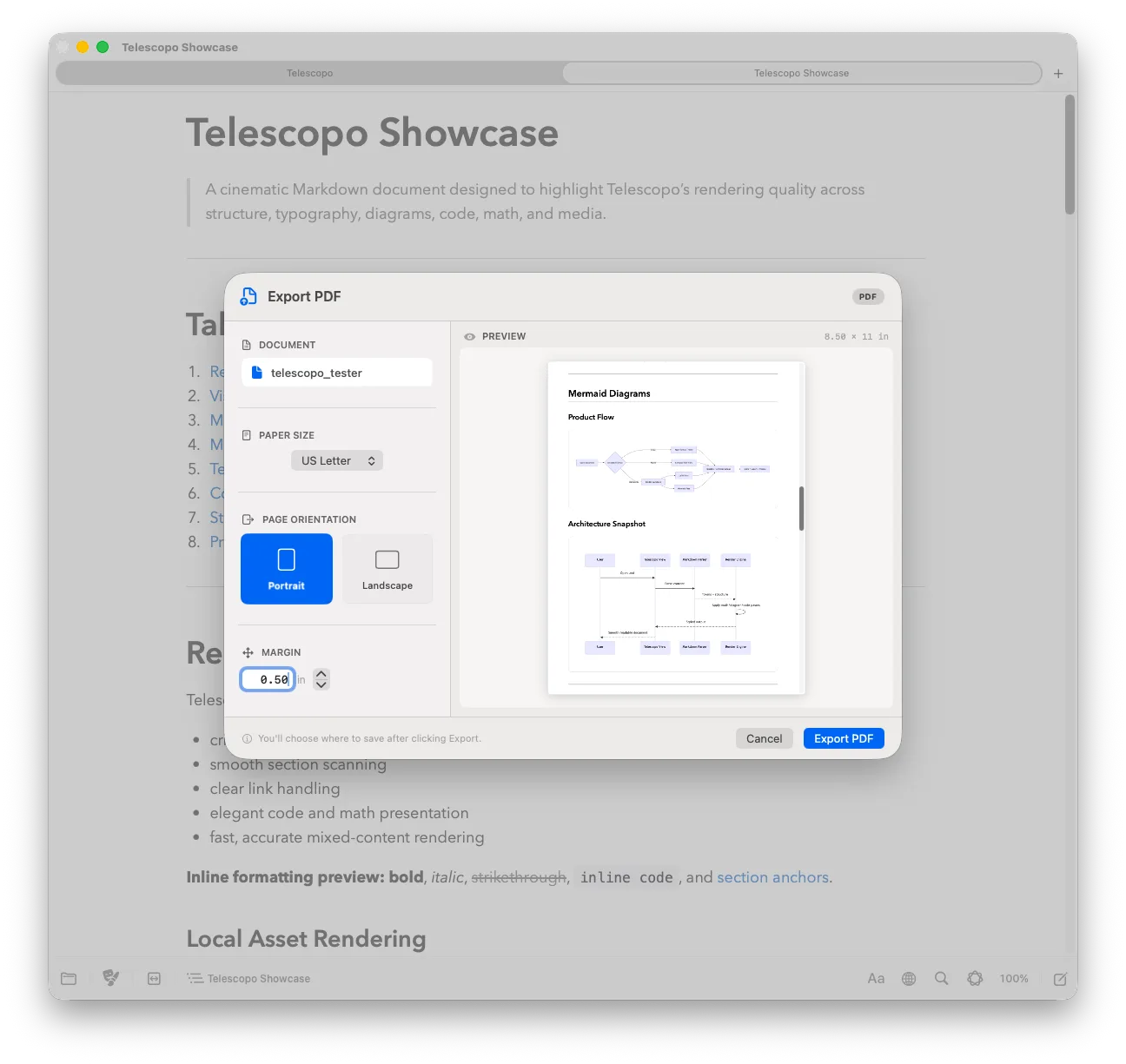
Telescopo Markdown Studio provides a PDF export flow with portrait and landscape preview. Selecting landscape gives wide Mermaid diagrams the horizontal space they were designed to occupy. No diagram truncation, no manual image substitution, and no post-processing.
The export renders the same document you see on screen, including Mermaid diagrams, typeset LaTeX equations, code blocks with syntax highlighting, images, tables, and prose. Telescopo also supports margins and paper sizes so the PDF can match the document you are actually delivering.
Portrait preview
Portrait works well for reports, notes, handouts, research, and readable long-form Markdown.
Landscape preview
Landscape gives architecture diagrams, process maps, wide tables, screenshots, and generated docs more horizontal space.
Theme-Aware: Preserving Your Visual Style
Many documentation teams work in dark mode and share dark-themed documents internally. Standard macOS print dialogs typically force white backgrounds regardless of your app's theme, which breaks the visual consistency of the document.
Telescopo Markdown Studio preserves your selected theme. If you are working in a dark theme, a high-contrast theme, or a premium Telescopo Markdown Studio theme, the PDF reflects those colors. Background, text color, syntax highlighting token colors, Mermaid diagram backgrounds, and typography carry through from the preview to the exported file.
Related: Dark Mode and Custom Themes for Reading Code and Markdown on Mac. Details on all 30 themes that are preserved in PDF export.
LaTeX Math in PDF Exports
LaTeX equations embedded in your Markdown are rendered at full resolution in the exported PDF. Both inline expressions and display-mode blocks are typeset with the same local rendering engine used for the on-screen preview. The result is crisp, scalable mathematical typography produced by bundled KaTeX, embedded seamlessly within your prose without requiring a separate LaTeX toolchain. KaTeX supports a broad mathematical subset of LaTeX; it is not a complete LaTeX compiler.
Related: How to View Markdown with Inline LaTeX Mathematics on macOS. Full details on Telescopo's local LaTeX rendering engine.
Who This Solves Problems For
Technical Writers
Producing API documentation or system architecture guides that include multiple Mermaid diagrams and need to be delivered as polished PDFs to non-technical stakeholders.
Engineering Leads
Sharing design proposals that combine sequence diagrams, architectural flowcharts, and decision text in a single readable document without manually assembling a slide deck.
Researchers
Exporting manuscript drafts that mix LaTeX equations with explanatory diagrams into shareable PDF proofs without running a full LaTeX compiler toolchain.
Project Managers
Distributing Gantt-chart-driven Markdown sprint plans as clean PDFs to stakeholders who do not have a Markdown viewer installed.
Frequently Asked Questions
Can Telescopo export Markdown with Mermaid diagrams to PDF on Mac?
Yes. Telescopo Markdown Studio exports fully rendered Markdown, including embedded Mermaid diagrams and LaTeX math, to polished PDF files on macOS.
Does Telescopo support landscape PDF export for wide diagrams?
Yes. Telescopo Markdown Studio supports portrait and landscape PDF previews so wide Mermaid flowcharts and Gantt charts can be exported without being clipped.
Which paper sizes does Telescopo support for Markdown PDF export?
Telescopo supports US Letter, A4, Legal, A3, and Tabloid paper sizes with custom margins and dynamic preview before saving the PDF.
Are themes preserved when exporting Markdown to PDF in Telescopo?
Yes. Telescopo Markdown Studio preserves your selected visual theme in exported PDFs, including background color, syntax highlighting colors, diagram styling, and typography.