Included with Telescopo Markdown Studio: Navigator powers clickable outlines and left/right section jumping for long Markdown documents, generated files, and rich Telescopo Markdown Studio workflows.
The Scrolling Problem in Large Markdown Documents
Well-structured Markdown documents use headings to organize content into logical sections. For short notes this is cosmetic. For large technical documents, those headings are essential navigation landmarks. A 12,000-word architecture proposal may have thirty or forty headings spread across six or seven top-level sections. Locating a specific sub-section by scrolling through all that content is slow and disorienting.
Most macOS Markdown viewers offer no structural navigation at all. They treat the document as a flat scroll of content. Telescopo Markdown Studio is different: Navigator reads your heading structure and gives it to you as a navigable outline.
Telescopo Navigator
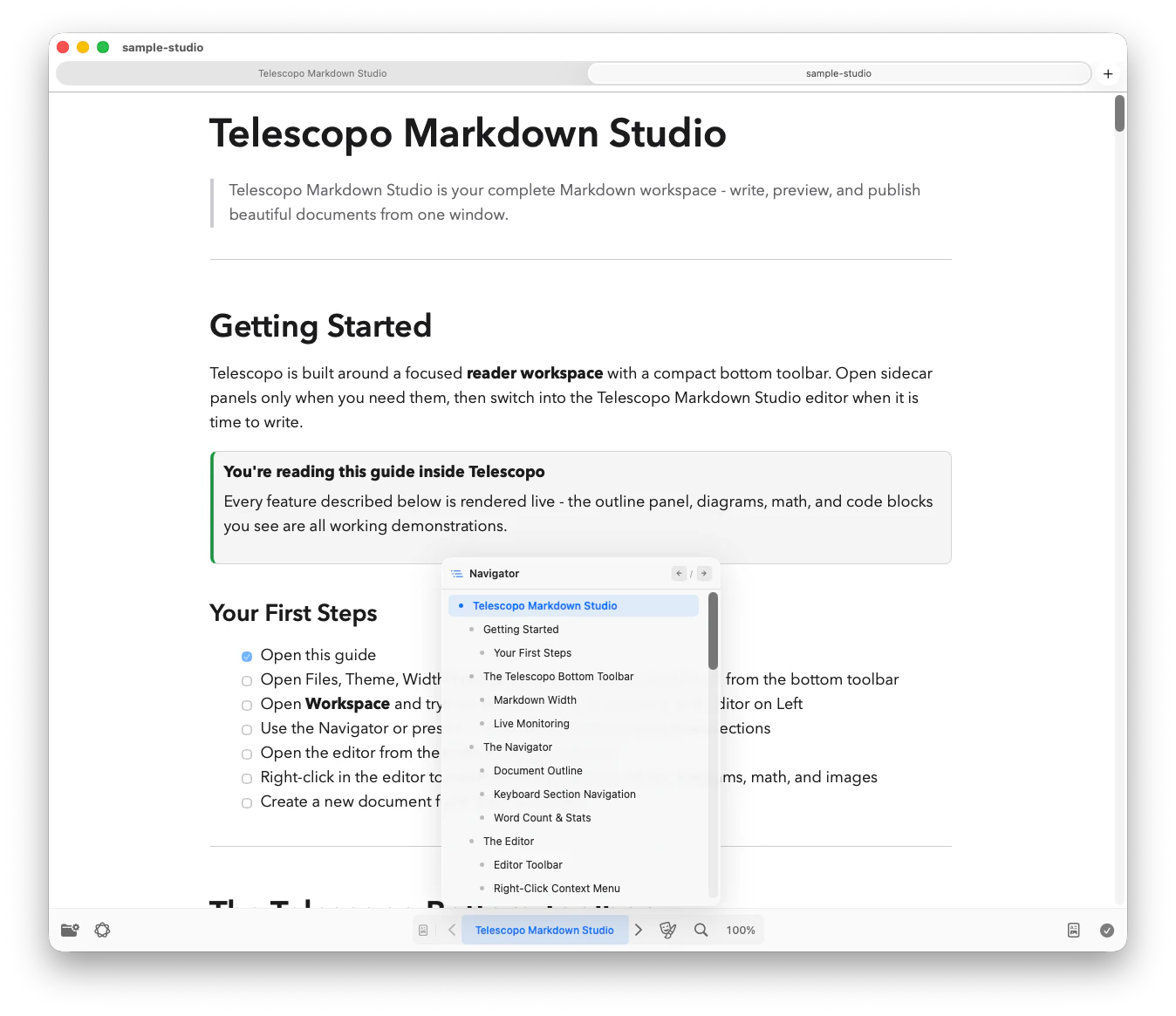
When you open a Markdown file in Telescopo, the Navigator panel automatically populates with every heading in the document, organized in a hierarchical outline that mirrors the H1, H2, and H3 structure of your file. The panel appears in the sidebar and updates instantly as you navigate the document.
Clicking any Navigator entry scrolls the main view to that heading. Left and right arrow shortcuts make it even faster to move to the previous or next dynamic section while reading a long document.
Why Native Performance Matters for Large Files
A 15,000-word Markdown file that contains multiple Mermaid diagrams, numerous code blocks, and dozens of headings represents a significant rendering workload. Viewers built on web technology (Electron, WebView) can struggle with this: slow initial render, janky scrolling, and delayed chapter index population are common complaints.
Telescopo Markdown Studio renders the document on the GPU. Chapter index generation happens on a background thread and does not block the visible content from appearing. The result is that even the largest Markdown files open without any perceptible delay, and the chapter outline is ready by the time you have read the first paragraph.
Use Cases for Large Markdown Navigation
System Design Documents
Architecture proposals and RFC-style documents with component overviews, API contracts, data flow diagrams, and deployment considerations spread across many sections.
Technical Runbooks
Operational playbooks with dozens of step-by-step procedures, each organized under a heading. Finding the right procedure quickly is critical during an incident.
Research Papers and Theses
Academic documents with abstract, methodology, results, discussion, and reference sections that are frequently revisited in a non-linear reading order.
Comprehensive API Docs
SDK documentation files with one heading per endpoint or function. Chapter navigation turns a 200-endpoint reference into a jump-searchable index.
Heading Hierarchy: H1, H2, and H3
Telescopo Navigator represents the heading hierarchy of your document. Top-level H1 headings appear as primary chapters. H2 headings appear as sub-sections indented beneath their parent H1. H3 headings appear as tertiary entries beneath their parent H2.
This three-level hierarchy covers the depth of the vast majority of real-world technical documents. The outline gives you an immediate sense of the document's scope and structure before you read a single line of prose.
Related: Best Mac Viewer for Advanced Markdown with Mermaid Diagrams. See how Mermaid diagrams render alongside Navigator-ready Markdown.
Best-Effort Automatic Chapters for Code Files
Telescopo now also supports best-effort automatic chapter generation for coding files. The system is adaptive and works on a per-file basis - it analyzes the structure of your source code (functions, classes, sections, imports) and generates navigable chapter markers that make it easier to jump between logical blocks in large files.
This is not a rigid parser tied to a single language. Instead, Telescopo uses heuristics that adapt to the file's contents, providing useful navigation landmarks even in unfamiliar codebases. Whether you're reading a 2,000-line Swift file or a dense Python module, the chapter panel gives you an at-a-glance outline of the file's structure.
Related: Code Viewer for Mac with Syntax Highlighting. Navigator pairs with syntax highlighting for navigating large codebases.
Frequently Asked Questions
Does Telescopo automatically generate a table of contents from Markdown headings?
Yes. Telescopo Navigator parses Markdown headings and generates a clickable outline in the sidebar. Left and right arrow shortcuts can jump between dynamic sections. This is part of the Telescopo Markdown Studio workflow.
Can Telescopo handle very large Markdown files without performance issues?
Yes. Telescopo is built natively for macOS and processes the chapter index asynchronously. Files with 10,000 or more words, dozens of headers, and multiple embedded diagrams open and scroll smoothly without lag.