Turn your slides into notes you can use. Bring a lecture, project update or training presentation into Telescopo, then keep working with its content on Mac, iPhone and iPad. Conversion runs on your device and leaves the original presentation unchanged.
Updated
Keep the ideas after the last slide
A presentation can be the beginning of a useful document. Build study notes from a lecture. Add the decisions behind a project update. Keep training material beside the instructions you use every day.
Bring the slide content into Markdown, then add your own explanation. Read it in Telescopo, edit visually or work in Markdown source, and link it to the notes you already have.
Give slide content room to work
Turn supported presentation text and lists into a readable document. Keep tables beside the discussion, follow links to supporting material and bring over embedded images.
Your content becomes Markdown you can continue editing. Keep the Markdown and its image folder together when moving or sharing the files.
See a presentation become Markdown
Our downloadable example brings eight slides into one Markdown document. It includes a project agenda, nested lists, a quarterly results table and an embedded image. Available data from its chart appears in a second table.
Download the original PowerPoint and converted Markdown
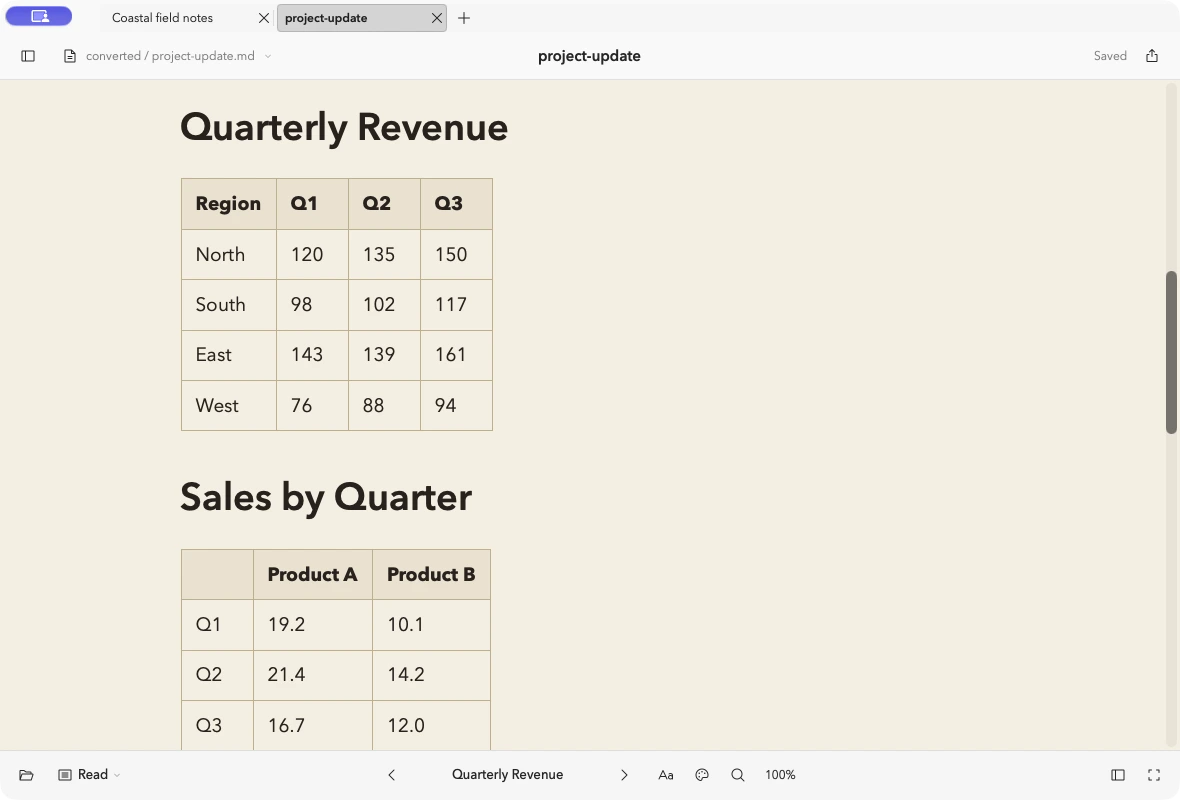
Open the Markdown to explore the result, or import the PowerPoint file to try the conversion yourself. The download includes the image attachment and source details.
Sample presentation: Samplelib, used under its reuse terms.
Bring over your Google Slides
In Google Slides, choose File → Download → Microsoft PowerPoint (.pptx). Import the downloaded file into Telescopo to turn its slide content into Markdown.
Keep the presentation in your project folder, then develop the notes alongside meeting records, research or the next draft of your brief.
Import and keep working
- On Mac, choose File → Import as Markdown…. On iPhone or iPad, open Library Tools → Import….
- Choose the presentation and review the converted Markdown.
- Check the name and destination, then choose Import.
Add the context your reader needs, connect related notes and export a PDF when you’re ready to share. Save the Markdown and its attachments in iCloud Drive to continue with those files on another device.
Supported presentation formats
| Source | File types |
|---|---|
| PowerPoint | PPT, PPS, POT, PPTX, PPTM, PPSX, PPSM |
| OpenDocument presentation | ODP |
| Google Slides | Download as PPTX, then import |
A few useful details
What do I need? Conversion requires paid access and supported hardware. Mac conversion requires Apple Silicon. Supported iPhone and iPad devices can convert files too. Setapp includes conversion on Mac; mobile uses App Store access.
Will it keep the slide design? Conversion brings presentation content into a Markdown document. Slide positioning, transitions and animations do not carry over. Review complex objects in the import preview.
How large can a file be? Files must fit within the app’s 32 MB import limit.
Bring the rest of the project
A presentation often has a report behind it and a spreadsheet behind the report. Keep that context close.
Convert Word, PDF, EPUB and other documents: DOC, DOCX, DOCM, ODT, RTF, EPUB and PDF.
Convert Excel, CSV and other spreadsheets: XLS, XLSX, XLSM, XLSB, ODS and CSV.
Try it in Telescopo
Explore the included sample documents for free. Opening and reading your own Markdown files, diagrams, and equations is free. Writing, conversion on supported hardware, and export require paid access. See access and subscription details.
Download Telescopo