Put the numbers beside the explanation. Turn an Excel workbook, CSV export or OpenDocument spreadsheet into Markdown you can read, edit and build into a report. Conversion runs on your device and saves a new Markdown file. Your original spreadsheet stays unchanged.
Updated
Make the spreadsheet part of the story
A budget needs context. Research results need an explanation. A project tracker needs the decisions behind the dates.
Bring that information into Telescopo and write around it. Worksheet data becomes readable tables, ready to sit beside your analysis and related notes. Keep developing the document in the visual editor or Markdown source, then export a PDF to share.
Keep the detail in the numbers
For supported XLSX and XLSM content, Telescopo carries over displayed dates, currencies and percentages. It also reads formula results already saved in the workbook, so the numbers can travel with the report.
Worksheet order stays intact. Review the converted tables, then add the explanation your reader needs.
Bring charts along
Compatible Excel charts become Mermaid diagrams that Telescopo renders in your document. Other available chart data becomes a labeled table, keeping the numbers close to the discussion.
This chart workflow supports XLSX and XLSM files. You can keep the generated diagram source in your Markdown and continue working with it in Telescopo.
See a workbook become a report
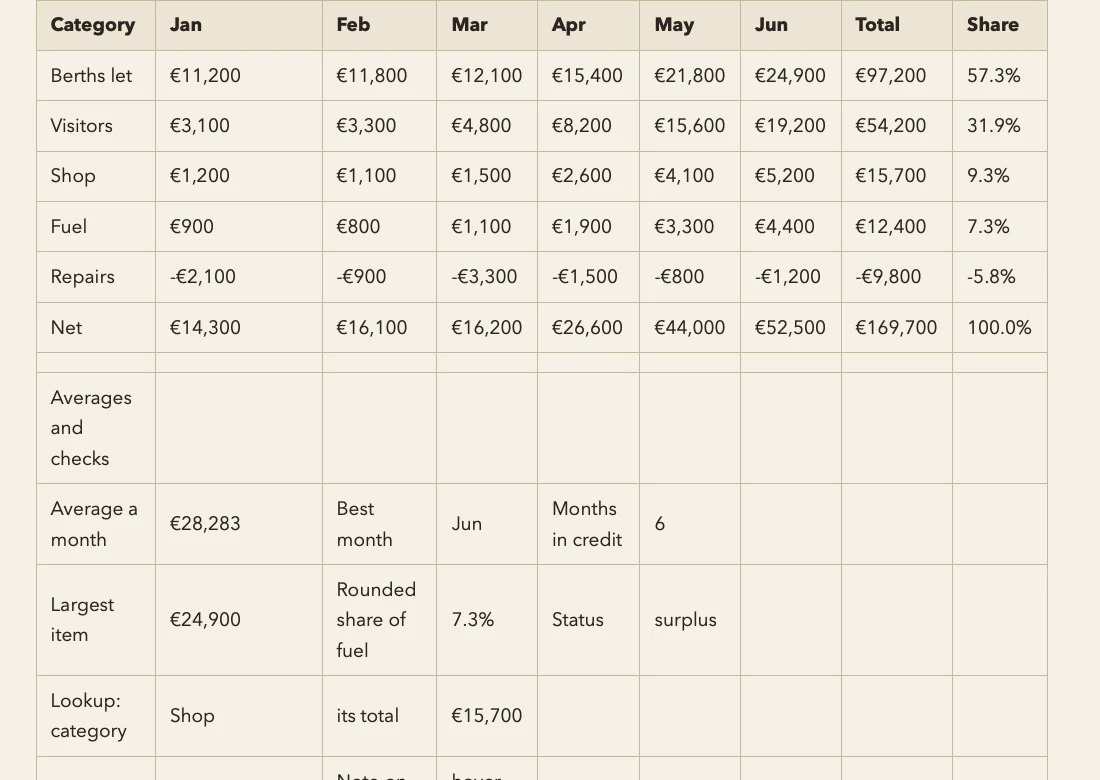
Our budget example brings together multiple worksheets, formatted values and saved formula results. Compare the workbook with its Markdown tables, then open the result in Telescopo.
Open the Charts section of the converted example to see chart data organized as labeled tables.
Download the original Excel workbook and converted Markdown
A smaller example turns three station readings and their line chart into a Markdown table and a Mermaid diagram. Download the station readings example.
Example source: exav project, released under CC0. The download includes the source details and image attachments where applicable.
Working in Google Sheets
Choose File → Download → Microsoft Excel (.xlsx) in Google Sheets, then import the downloaded workbook into Telescopo.
For a single table, CSV is another convenient option. Bring in the data, add your commentary and keep it beside the rest of your notes.
Turn CSV into a Markdown table
Import a research log, inventory or project export without rebuilding the table by hand. Telescopo handles quoted commas and quotation marks, along with text and empty values.
Use the result as the starting point for a report, a reference table or a document you're sharing with your team.
Import and keep working
- On Mac, choose File → Import as Markdown…. On iPhone or iPad, open Library Tools → Import….
- Choose the workbook or CSV file and review the converted Markdown.
- Check the name and destination, then choose Import.
Continue writing around the data. Link the report to related notes, or save it in iCloud Drive to work with the same files on another device.
Supported spreadsheet formats
| Source | File types |
|---|---|
| Excel | XLS, XLSX, XLSM, XLSB |
| OpenDocument spreadsheet | ODS |
| Delimited data | CSV |
A few useful details
What do I need? Conversion requires paid access and supported hardware. Mac conversion requires Apple Silicon. Supported iPhone and iPad devices can convert files too. Setapp includes conversion on Mac; mobile uses App Store access.
What happens to formulas? Telescopo imports saved results rather than recalculating formulas. If a result is unavailable, the import review lets you know.
How large can a file be? Files must fit within the app's 32 MB import limit.
Give the numbers some context
Bring the table into your notes and keep working on the explanation.
Download Telescopo · Access and subscriptions
Bringing over a document
Convert Word, PDF, EPUB and other documents to Markdown.
More formats in Telescopo
Convert PowerPoint, Google Slides exports and OpenDocument presentations: PPT, PPS, POT, PPTX, PPTM, PPSX, PPSM and ODP.
Document imports include DOC, DOCX, DOCM, ODT, RTF, EPUB and PDF. Explore document conversion.
Try it in Telescopo
Explore the included sample documents for free. Opening and reading your own Markdown files, diagrams, and equations is free. Writing, conversion on supported hardware, and export require paid access. See access and subscription details.
Download Telescopo